I’ve decided to try the simplest Windows 11 version.
Consider this note as my personal reminder. Nothing interesting to see here.
So what exactly is Windows 11 Home Single Language? In simple words, it is Windows 11 Home, but without the ability to change the UI language. You choose the language only once during installation. You need the correct Windows ISO for your region, and after that, you are locked in. No switching. No going back. Without hacks, of course.
This makes it feel like older Windows editions. Remember when only Windows 7 Pro let you change the language? Same energy here. As someone who has used Windows since forever, I honestly do not see this as a problem. You pick your language and move on with life. In all other aspects, it is just Windows 11 Home. If you care about the full list of differences between Home and Pro, Microsoft has a comparison page, but for most people the gap is smaller than it seems.
Now, why did I install it? Just for fun. That is always the answer.
I installed it on March 1st. Almost a month has passed. And I still cannot find any real difference from the Pro version in how I use the system. I am not running a business server here, so the missing features never show up in my daily routine.
Yes, the Group Policy Editor is missing. You cannot open gpedit.msc and click around. But here is the thing: Group Policies themselves still work. You just need to spend a few extra minutes searching for the right registry keys or the manual settings online. It takes a little more time, but the policies I care about work perfectly fine. That small trade-off feels fair for a free experiment.
Of course, I should mention that this machine is not my work computer. It is my playground. I use it for Windows app development, listening to music, editing videos, and other casual hobby stuff. The usual routine. Nothing mission-critical. If this were my main work machine, maybe I would feel differently, but for hobby projects it fits perfectly.
There was one small annoyance, though. MyAsus installed itself automatically from the Microsoft Store. This never happened on Windows 11 Pro. It seems to be a Home edition thing, maybe because OEMs have extra freedom there. But honestly, it is not a big deal. You can uninstall it in ten seconds. Why do I remove it? Because I use flowOSD, of course!
And here is a bonus observation. Memory consumption sits at only 3.3 GB after boot. That is lighter than I expected for a modern Windows version. No complaints there.
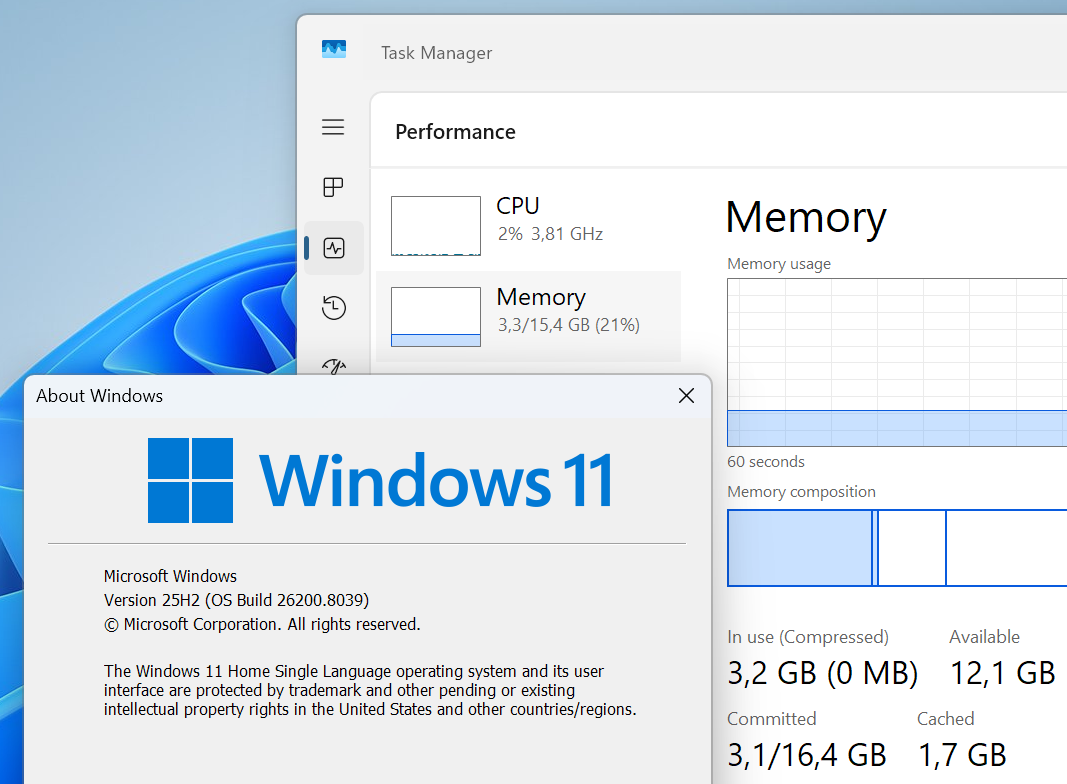
So overall, Single Language edition is just Windows 11 with fewer language options. If you only need one language anyway, you will probably never notice the difference. Sometimes the simplest version is all you really need.