When a menu needs to be created based on changing data, the first thought is data binding. But then you remember: MenuFlyout does not support it. What should we do?
Attached properties come to the rescue. What are they and how do they help in creating a dynamic menu? That’s the topic of my post today.
So, what are Attached Properties in WinUI 3, and how are they different from regular Dependency Properties?
It’s a special kind of property. It’s defined in one class but can be “attached” and set on other objects.
Think of it like a sticky note or a tag. For example, Grid defines properties like Grid.Row and Grid.Column. These properties don’t exist on a Button or a TextBlock. But you can “attach” them to a Button placed inside the Grid to tell the Grid where to put that button.
How are they different from regular Dependency Properties?
A regular property belongs to its class (like
Textfor aTextBox). An attached property is defined by one class (likeGrid) but is used as an attribute for other classes.An attached property is registered using
RegisterAttached(not justRegister) and requires specialGetandSetmethods.In XAML, an attached property is always written with a dot and the name of the owning class, for example,
Grid.Row.
Why are they useful? They allow different parts of the UI to interact in a simple and flexible way. A parent element (like a Grid) sets the rules, and child elements use attached properties to follow those rules.
You can (and should!) read more about it using the links at the end of the post.
Let’s get back to our MenuFlyout. As an example, I will look at a task I recently solved for my (not yet published) video player: I needed to create a menu for selecting audio tracks and subtitles.
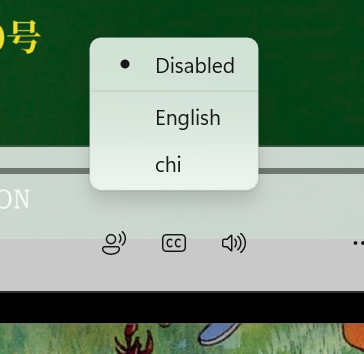
The main idea here is this: attach a ViewModel to the menu. When the data in the ViewModel changes, update the menu items (in this case, completely rebuild the menu).
For this, I created a static helper class called TrackSelector. It implements an attached dependency property:
// A static helper class whose sole purpose is to define and manage our new attached property.
public static class TrackSelector
{
    // The declaration of the attached dependency property itself.
    // 1. "ViewModel" - the official name of the property in the dependency system.
    // 2. typeof(ITrackSelectorViewModel) - the type of data this property can store (must implement this interface).
    // 3. typeof(TrackSelector) - the owner class that defines this property (this class).
    // 4. new PropertyMetadata(...) - property settings:
    //    - null: default value when the property is not set.
    //    - OnViewModelChanged: the callback method that will be automatically called
    //      when the value of this property is changed on any MenuFlyout.
    public static readonly DependencyProperty ViewModelProperty = DependencyProperty.RegisterAttached(
        "ViewModel",
        typeof(ITrackSelectorViewModel),
        typeof(TrackSelector),
        new PropertyMetadata(null, OnViewModelChanged));

    // Standard static getter method for an attached property.
    // Gets the current value of the ViewModel property from the specified MenuFlyout.
    // Returns null if the property is not set.
    public static ITrackSelectorViewModel? GetViewModel(MenuFlyout menu) => menu.GetValue(ViewModelProperty) as ITrackSelectorViewModel;

    // Standard static setter method for an attached property.
    // Sets a new value for the ViewModel property on the specified MenuFlyout.
    // Setting the value will trigger the OnViewModelChanged callback.
    public static void SetViewModel(MenuFlyout menu, ITrackSelectorViewModel value) => menu.SetValue(ViewModelProperty, value);
}
ITrackSelectorViewModel is the type for the View Model. Audio tracks and subtitles are similar, but they still have differences. So they use different View Models. However, they create their menu items in the same way.
When the View Model changes (meaning when data binding triggers), the OnViewModelChanged method is called:
// A special dictionary to store a link between a MenuFlyout and its subscription object.
// ConditionalWeakTable allows the garbage collector to clean up the menu
// without worrying about memory leaks from this table.
private static readonly ConditionalWeakTable<MenuFlyout, IDisposable> _subscriptions = [];

private static void OnViewModelChanged(DependencyObject d, DependencyPropertyChangedEventArgs e)
{
    // 1. Check that the property was set on a MenuFlyout.
    //    If not (e.g., set on a Button by mistake), exit.
    if (d is MenuFlyout menu is false)
    {
        return;
    }

    // 2. If this menu already had a subscription to an old ViewModel,
    //    we need to clean it up (dispose) and remove it from the table.
    if (_subscriptions.TryGetValue(menu, out var disposable))
    {
        disposable.Dispose(); // Stop listening to the old ViewModel.
        _subscriptions.Remove(menu); // Remove the old link.
    }

    // 3. Check if a new ViewModel was provided (e.NewValue is not null).
    if (e.NewValue is ITrackSelectorViewModel viewModel)
    {
        // 4. Create a new subscription object for this menu and the new ViewModel.
        //    This object will handle listening to the ViewModel's changes.
        var subscription = new Subscription(menu, viewModel);
        // 5. Immediately build the menu items for the first time.
        subscription.UpdateMenu();

        // 6. Store the new subscription in the table, linked to this menu.
        _subscriptions.Add(menu, subscription);
    }
    else
    {
        // 7. If the new value is null, simply clear all items from the menu.
        menu.Items.Clear();
    }
}
ConditionalWeakTable is essential here to avoid memory leaks. We only control setting the property, not the lifetime of the MenuFlyout object itself. This table uses weak references, so it doesn’t prevent the menu from being garbage-collected. When the menu is destroyed, our entry is automatically removed.
The Subscription class encapsulates the logic for building the menu when the data changes. It rebuilds the menu and marks a menu item as selected. For the last part, we use a small hack: the menu item isn’t actually selected; we only add a dot icon to it to mimic a radio button.
While the TrackSelector class is somewhat reusable, the Subscription class is written for a specific View Model. Here is its code (just for reference):
// A private helper class that manages the subscription to a specific ViewModel for a specific MenuFlyout.
// It listens for changes in the ViewModel and updates the menu accordingly.
private sealed class Subscription : IDisposable
{
    // Constructor: sets up the link between the menu and its ViewModel.
    public Subscription(MenuFlyout menu, ITrackSelectorViewModel viewModel)
    {
        _menu = menu;
        _viewModel = viewModel;

        // 1. Create an observable stream from the ViewModel's PropertyChanged event.
        //    This allows us to react to property changes in a reactive way.
        var observable = Observable.FromEventPattern<PropertyChangedEventHandler, PropertyChangedEventArgs>(
            h => _viewModel.PropertyChanged += h,
            h => _viewModel.PropertyChanged -= h);

        // 2. Subscription 1: Listen for changes in the 'Tracks' collection.
        //    When the list of tracks changes, rebuild the entire menu.
        observable
            .Where(e => e.EventArgs.PropertyName is nameof(AudioTrackSelectorViewModel.Tracks))
            .Subscribe(_ => UpdateMenu())
            .DisposeWith(_disposable); // Ensure this subscription is cleaned up when the Subscription object is disposed.

        // 3. Subscription 2: Listen for changes in the 'SelectedTrackId'.
        //    When the selected track changes, update the visual selection mark (icon) in the menu.
        observable
            .Where(e => e.EventArgs.PropertyName is nameof(AudioTrackSelectorViewModel.SelectedTrackId))
            .Subscribe(_ => UpdateSelectedMenuItem())
            .DisposeWith(_disposable);
    }

    // A collection for all disposable resources (like Rx subscriptions) used by this class.
    private readonly CompositeDisposable _disposable = [];
    private readonly MenuFlyout _menu;
    private readonly ITrackSelectorViewModel _viewModel;

    // The main method that rebuilds the menu from scratch based on the current data in ViewModel.Tracks.
    public void UpdateMenu()
    {
        // Clear all existing items in the menu.
        _menu.Items.Clear();

        // Loop through each track provided by the ViewModel.
        foreach (var item in _viewModel.Tracks)
        {
            // Special handling for a "disabled" option (e.g., "No subtitles").
            // Adds a separator after the disabled option if it's the first item.
            if (_viewModel.HasDisabledTrack && _menu.Items.Count is 0)
            {
                _menu.Items.Add(new MenuFlyoutItem
                {
                    Tag = null, // Tag stores the identifier (here null for "disabled").
                    Text = "Disabled",
                    Command = _viewModel.SelectTrackCommand,
                    CommandParameter = null // Passing null as the parameter for the "disabled" command.
                });

                _menu.Items.Add(new MenuFlyoutSeparator()); // Visual separator.
            }

            // Create a standard menu item for a track.
            var menuItem = new MenuFlyoutItem
            {
                Tag = item.Id, // Store the track's ID in the Tag property for later identification.
                Text = item.Language + (string.IsNullOrEmpty(item.Description) ? "" : $" ({item.Description})"), // Format the display text.
                Command = _viewModel.SelectTrackCommand, // The command to execute when this item is clicked.
                CommandParameter = item.Id, // Pass the track's ID as the command parameter.
            };

            _menu.Items.Add(menuItem);
        }

        // After rebuilding the items, update which one is visually marked as selected.
        UpdateSelectedMenuItem();
    }

    // Updates the visual indication of the selected menu item (adds/removes a checkmark icon).
    private void UpdateSelectedMenuItem()
    {
        // Go through all MenuFlyoutItem objects in the menu.
        foreach (var item in _menu.Items.OfType<MenuFlyoutItem>())
        {
            // Check if this item's Tag (the stored track ID) matches the currently selected ID in the ViewModel.
            item.Icon = _viewModel.SelectedTrackId == item.Tag as int?
                ? new FontIcon { Glyph = "\uE915" } // If selected, add a checkmark icon (using Segoe MDL2 Assets glyph).
                : null; // If not selected, ensure no icon is set.
        }
    }

    // Standard Dispose pattern. Cleans up all Rx subscriptions when this Subscription object is no longer needed.
    public void Dispose()
    {
        if (!_disposable.IsDisposed)
        {
            _disposable.Dispose();
        }
    }
}
So, this class can be used for any menu in the application. You don’t need to write more code to rebuild the menu when the data changes. In XAML, the binding looks like this:
<MenuFlyout h:TrackSelector.ViewModel="{x:Bind ViewModel.SubtitleTrackSelectorViewModel, Mode=OneWay}"/>
Quite elegant, isn’t it?
Honestly, this text was written right after implementing the feature. There’s no guarantee that everything will work as intended (but for now, it does work). If I discover any issues during the software’s use, I will add updates to the post.
Links for further reading:
Happy coding!